Run Claude Code With Local LLMs Using Ollama
3/6/2026
Motivation
Imagine that you could have the same experience as Claude Code for free running in your local machine...
In this article you'll learn:
- How to install Ollama and Claude code.
- How to use Ollama to run local LLMs.
- Run Claude Code targeting a local model.
Some basic knowledge is recommended
- Some linux/MacOS experience in the terminal, mainly for updating configuration files.
Please note that this article is most suited for Linux/Mac users, as I don't know the minutia of windows configurations. That being said, the concepts still apply to all three OS.
Requirements
- A PC with good specs. Sorry, a laptop probably won't do :/ you can still try to run smaller models... but it won't be ideal.
- 20GB+ of free space: Models are heavy...
Understanding the architecture you'll be running locally
These are the components we'll use.
- Ollama → runs the model
- Claude Code CLI → the coding agent that talks to the model
flowchart TD
    Claude Code (Agent) -- API calls --> Ollama server (localhost:11434)
    Ollama server  --> Local model
The important thing to notice here is that Claude does not manage the model itself, instead, it communicates with Ollama.
This separation allows Claude to act as a client and Ollama as a server.
Ollama
Ollama is a tool that helps you run LLMs in your local machine.
You can use models like: Llama3, Mistral or Code Llama for chatting, coding or text generation. The best analogy is to think of it like Docker. With Ollama you can pull models and run them.
You can find more information in their webpage.
If you go to their download page, you'll find this command to install it in Linux:
$ curl -fsSL https://ollama.com/install.sh | sh
Depending on your OS, Ollama will be installed differently. Here I will only cover the case in which you're installing it in a Linux distribution.
That being said, MacOS and Windows installation should manage it using UI, so you should not have issues running the Ollama server.
The script will install Ollama as a systemd service and will create a dedicated ollama system user.
$ which ollama
/usr/local/bin/ollama
As it is a systemd service you can start it, stop it and check its status as you normally would do:
$ sudo systemctl status ollama
$ sudo systemctl stop ollama
$ sudo systemctl start ollama
NOTE: you can check on logs like this:
$ journalctl -u ollama -fFirst, lets check if Ollama server is running correcly:
$ curl http://localhost:11434
Ollama is running
If you get the message "Ollama is running", then everything is ok and the server is running correctly in the background.
If everything went well, you should be able to run the Ollama CLI, it will look like this:
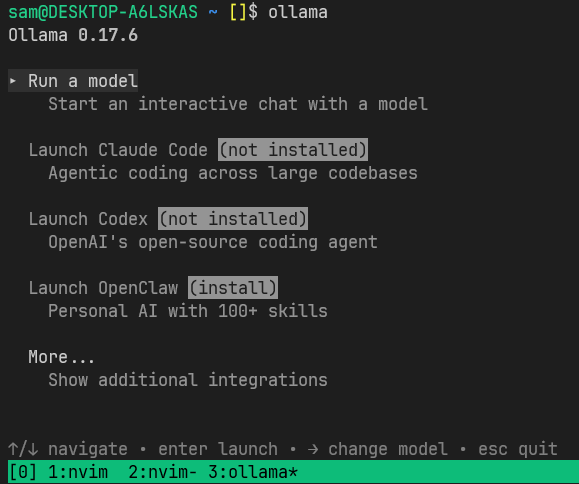
You can check on the version of th CLI and list all the models that you have downloaded like this:
$ ollama -v
$ ollama list
UPDATE: Use the same version as mine v0.17.6. The newer version v0.18 introduces breaking changes.
Claude Code
First install Claude Code.
$ curl -fsSL https://claude.ai/install.sh | bash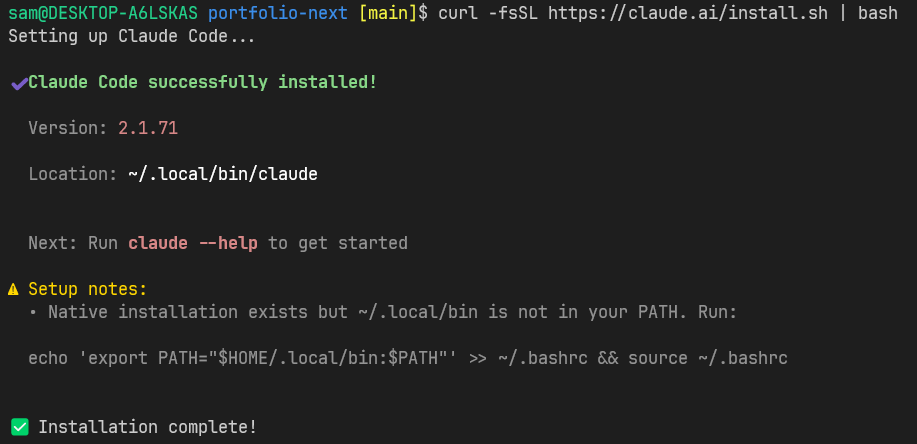
After the installation is done and you see a warning related to the PATH like the in the image above, just run what is indicated to add it to the shell you are using, in my case is BASH.
$ echo 'export PATH="$HOME/.local/bin:$PATH"' >> ~/.bashrc && source ~/.bashrcWithout going into too much detail, this will append a line into ~/.bashrc
file and source the the file so that all the variables will be loaded again
to the current terminal session, you only need to do this once, from now on
every time you open a new terminal the variables will be automatically loaded
to the environment. Essentially, that lines assures that you terminal knows
where the claude executable is.
So now, you can run the Claude CLI:
$ claude --version
2.1.71 (Claude Code)
Great! now we're in a good position to run claude with our Ollama models.
Choosing an Ollama model
First we need to choose a model, I've choosen qwen3.5:9b.
Why this model? I'll quote Ben Hall, who wrote a prolific article about it: Local AI Models for Coding: Is It Realistic in 2026?
Alibaba’s Qwen 2.5 Coder series currently dominates local coding benchmarks. for realistic hardware. It is a “standard” instruct model: you ask for code, and it gives you code immediately.
The article was writen in 2025, so we now have Qwen3 which in my experience
I've found is more compatible with Claude Code.
Please note that not every single model will be compatible with Claude Code! you'll need to do some research if you choose different models.
Don't worry if the 9b model doesn't work for you, Qwen relesed several other
models, the smallest being qwen3.5:0.8b. You cn find more in the
Ollama web page.
Once we choose a mode, we can pull it like this:
$ ollama pull qwen3.5:9bSetting up Ollama with Claude Code
Now that we have Claude Code and Ollama setup with the model.
Claude Code → Ollama with qwen3.5:9b
If you go to the documentation
you'll see that they suggest to launch claude code using Ollama like this
ollama launch claude --config. This is just a handy way in which Ollama will
set some contextual variables and run Claude code. I won't discourage you to do
so, I only want you to understand what exactly this does.
The more clear approach is to:
- Start Ollama.
- Pull the model you want to use (pull only once)
- Run claude code using Ollama.
Let's update again our SHELL configuration file, remember, it depends if you're
using .bashrc, .zsrc, etc. In my .bashrc I'll add two variables:
# ~/.bashrc
# ...
# append at the end:
export ANTHROPIC_BASE_URL=http://localhost:11434
export ANTHROPIC_AUTH_TOKEN=ollama
export ANTHROPIC_MODEL="qwen3.5:9b"
Save and source the file again:
$ source ~/.bashrcSetting it up this way you make Claude Code think that is talking got Antropic API, when in reality is routing the queries to the local Ollama model.
Also it will select qwen3.5:9b as the default model.
Finally, we'll run Claude with the model that we've downloaded before with
Ollama. First cd into your project's directory and from there, start Claude:
$ claudeIf you like to experiment with multiple models, you can just remove the
ANTHROPIC_MODEL variable from your ~/.bashrc configuration file and specify
the models when running claude like this:
$ claude --model qwen3.5:9b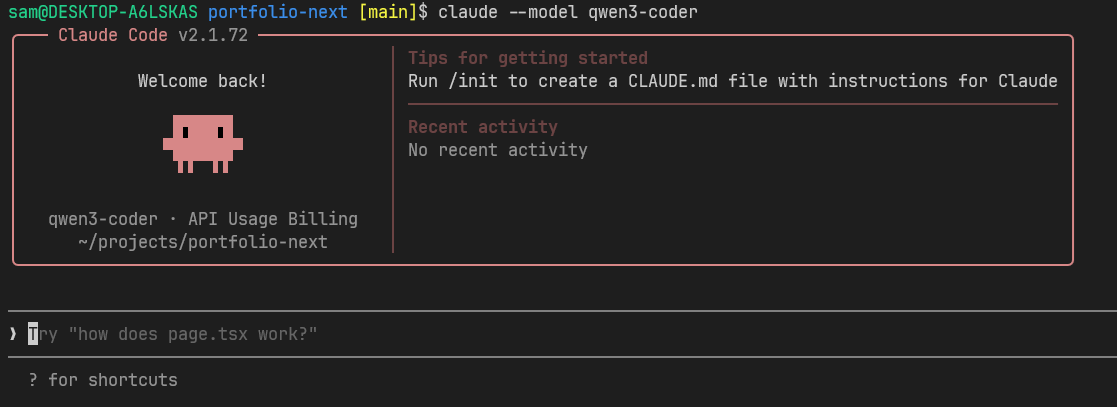
I thinks this is a good time to stop for a while and review what we did:
- We review what Ollama is and how it is installed.
- We installed Claude Code CLI.
- We setup environment variables to route Claude Code queries to use Ollama models.
Clean up
Let's say you're done with the experiment and you want to reclaim your space in disk.
To remove the model:
$ ollama rm qwen3.5:9bIf you can't remember the right command, just write ollama --help.
I think In another article I'll try to explore Claude Code capabilities in more details.
I hope you enjoyed this article! if you did, please send me an email! It will encourage me to write more. :)
Afterthought
Antropic wants people to run Claude Code with its own models and it is constantly making braking changes that make settings like these more difficult. For this, I would suggest that you choose other AI coding tool like Open Code, which has a very similiar interface.
References
- Ollama Official webpage - https://ollama.com
- Ollama Claude Code integration - https://docs.ollama.com/integrations/claude-code
- Local AI Models for Coding: Is It Realistic in 2026? - https://failingfast.io/local-coding-ai-models/
- Qwen3 Coder - https://ollama.com/library/qwen3-coder
- Connecting claude code to locall llms two practical approaches
- Claude Code Router documentation
- Ollama Qwen3 models
- Open Code
If you liked this posts, please consider supporting me by buying me a coffee! :)